
Zoom Out 3D
Coco Play By TabTaleTrivia
4.4712.00 Reviews
- Version
- 1.0.1.5
- Installs
- 10.00M
- Age Rating
- Everyone 10+
Screenshots
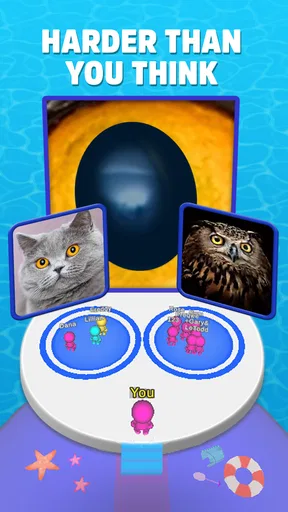
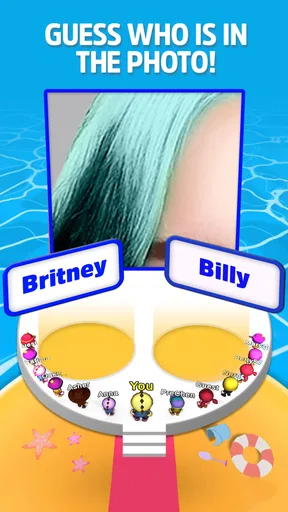
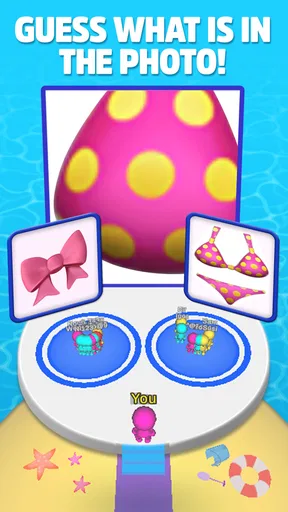
Our Review of Zoom Out 3D
 Analysis by Appyee
Zoom Out 3D is a celebrity guessing game that turns recognition into a visual challenge: instead of showing you a complete image immediately, it asks you to work out who you are looking at as the picture becomes clearer. I found the idea easy to understand within seconds, but the real appeal is in that small pause before the answer becomes obvious. It is the kind of game I can open for a quick break without needing to learn a complicated rule set.
Developed by Coco Play By TabTale, this trivia game is free and aimed at players aged 10 and over. It has reached more than ten million installs and holds an average rating of 4.4 from roughly fifty-three thousand ratings, which suggests that the simple guessing format has found a broad audience. The current version is 1.0.1.5, and it supports Android 7.0 or later. Those details make it accessible on many older Android phones, although the experience can still depend on how well the individual device handles the game.
Where the first few rounds can become confusing
The main difficulty is not understanding the objective; it is learning how much visual information to trust at each moment. A partially revealed celebrity image can make you focus on a hairstyle, pose, color, or facial outline that seems familiar but points you in the wrong direction. I quickly learned that guessing too early is usually less useful than taking a second to study the whole composition.
That is an important distinction between this game and a conventional trivia quiz. In a text-based quiz, I can reason from a question and several possible answers. Here, my first task is visual filtering. I have to decide whether the clue is genuinely recognizable or whether I am simply reacting to one familiar detail. Players who enjoy image puzzles will probably appreciate that tension, while anyone looking for factual questions about films, music, or biography may find the format narrower than expected.
Another place users may get stuck is the meaning of the three-dimensional presentation. The “3D” element is part of the visual identity, but it does not turn the game into an exploration title or an action game. I approached it as a focused image-guessing experience rather than expecting movement-heavy gameplay. That expectation matters because the game works best when I treat each round as a short observation exercise, not as a large interactive world.
The celebrity theme also creates a natural knowledge gap. I may recognize widely known faces quickly, but less familiar subjects can make a round feel like a blind guess rather than a test of deduction. That is not necessarily a flaw, yet it changes who will enjoy the game most. It suits people who follow popular entertainment and like visual recognition. It is less suitable for someone who prefers puzzles with enough logical clues to solve every answer without relying on cultural familiarity.
The most useful early habit is to separate recognition from confidence. If a face looks familiar, I pause and ask myself what I actually recognized. Was it the face, the silhouette, or only a color and hairstyle? That small check prevents many rushed answers and makes the game feel more like a puzzle than a sequence of guesses.
What to check before blaming the game
When a game like this does not start properly, the first checks should be ordinary and practical. I would begin by confirming that the phone is running Android 7.0 or newer, since that is the stated minimum operating system. A device that falls below that requirement is not a good candidate for troubleshooting through repeated reinstalls; the compatibility limit is the more likely explanation.
On a supported phone, I would close other demanding apps, reopen the game, and make sure the device has enough free storage for normal operation. I would also check whether the phone is behaving normally in other apps. If several applications are slow, freezing, or failing to load, the issue may be the device rather than Zoom Out 3D itself. A simple restart is worth trying before making more disruptive changes.
Installation problems deserve a similarly careful approach. I would use the official app store, check that the download has completed, and avoid repeatedly tapping the install button while the store is still processing. If the store itself cannot download anything, testing another app can help identify whether the problem is specific to this game or part of a wider store, connection, or device issue.
It is also sensible to start with a stable connection when first opening the game, even though the core idea is a self-contained guessing activity. A temporary connection problem can affect installation, loading, or any store-connected part of the experience. I would not immediately assume that a frozen screen means the game has permanently failed. Closing it fully and launching it again is a safer first step than deleting local data.
Players should be cautious with aggressive troubleshooting. Clearing storage or uninstalling can remove local progress if the game does not restore it automatically. I would reserve those actions for cases where restarting, checking compatibility, and confirming the installation have not helped. This is especially important for a casual game: a small loading problem is frustrating, but losing progress while trying to fix it can be worse.
Recovering a session without losing patience
If the game opens but a round behaves strangely, I would first finish or exit that round in the normal way if the controls still respond. Then I would return to the main screen and start again rather than repeatedly pressing the same control. Repeated taps can make a slow interface look completely unresponsive, while the game is still processing the first command.
If the screen remains stuck, I would force-close the app through the phone’s normal app controls and reopen it. This is a straightforward recovery step that does not immediately erase anything. After reopening, I would check whether the problem affects one particular round or the entire game. That distinction is useful: a single interrupted session may be temporary, while a failure that appears every time points more strongly toward compatibility, installation, or device conditions.
My approach would be different for a screen that looks visually wrong. I would first adjust the phone’s brightness and check whether the same display issue appears elsewhere. Screen overlays, unusual display settings, or a device that is overheating can make an image appear darker or less responsive than expected. If other apps display normally and only this game is affected, restarting the game remains the sensible next step before changing system settings.
Players who are unsure about an answer should avoid turning recovery into guesswork. The game’s central challenge is already based on incomplete visual information, so a rushed tap can create confusion between a wrong answer and a technical problem. I found it helpful to slow down, inspect the image again, and only then decide whether the round had actually malfunctioned.
A practical routine is to play in short sessions and close the game normally when finished. This will not solve every problem, but it reduces the chance of returning to a session that was left in an uncertain state. It also fits the design better. Zoom Out 3D is strongest as a quick entertainment option, not as a game that demands a long uninterrupted sitting.
When the app is not the real cause
Some complaints that appear to concern the game are really about expectations. If someone wants a deep celebrity database, detailed explanations for every answer, or a traditional question-and-answer format, this may feel too light even when it is working correctly. The game is built around visual guessing, so its entertainment value depends heavily on whether that specific loop is enjoyable to the player.
Phone performance can also change the experience. The minimum operating system is relatively broad, but operating-system support does not guarantee identical speed on every device. An older phone may open the game successfully while still taking longer to switch screens. Before deciding that the game is defective, I would compare its behavior with other recently used applications and check whether the phone has been running low on storage or memory.
Age and audience are worth considering as well. The Everyone 10+ rating makes it more appropriate for older children and general family play than for very young users. A parent choosing it for a child should still consider whether celebrity recognition is the type of content they want to encourage. The rating is not a promise that every player will find the subject matter equally engaging; it simply gives a broad indication of the intended age range.
The free price makes trying it easy, but free access does not automatically mean it will suit every playing style. I would recommend testing a few rounds before deciding whether it deserves a permanent place on the phone. Someone who wants a no-commitment distraction has little to lose by trying it. Someone who dislikes guessing based on appearance may be better served by a general trivia app with written questions and clearly defined categories.
Compared with a standard quiz, this game has less value as a learning tool because the primary reward comes from recognition rather than from discovering a fact. Compared with a large celebrity database or a social guessing game, it feels more focused and easier to pick up, but potentially less satisfying for players who want extensive context or competition. That trade-off is central: its simplicity is both its strength and its limitation.
Small habits that make the guessing loop better
I found three practical ways to get more from the format. First, I treat the image as a composition instead of staring only at the face. Clothing, posture, background color, and the outline of the subject can all help, but none should dominate the decision on its own. This reduces the number of guesses based on a single misleading detail.
Second, I use a two-pass approach. On the first look, I form a short list of possible identities. On the second, I try to disprove that list by checking whether the visible features really match. This is more reliable than immediately choosing the first name that comes to mind, and it turns a very simple game into a modest exercise in visual reasoning.
Third, I separate technical troubleshooting from gameplay decisions. If an answer was rejected, I do not assume the interface failed just because I felt certain. I check whether the selection registered and whether the next screen responds normally. This distinction keeps frustration under control and prevents unnecessary resets that could affect local progress.
These habits are especially useful in a shared setting. During a short break with friends or family, one person can make the first identification while another challenges the confidence behind it. That creates conversation without requiring a competitive mode or a long setup. The game is a good fit for those moments because its rules are visible through play and do not need a lengthy explanation.
Who should install it, and who should skip it?
I would recommend Zoom Out 3D to players who enjoy celebrity recognition, quick visual puzzles, and games that can be understood immediately. It is also a reasonable choice for a parent looking for a simple entertainment title for an older child, provided the celebrity-focused theme is appropriate for the family. The broad install base and 4.4 average suggest that the concept connects with many players, although popularity alone cannot replace personal preference.
I would be more hesitant to recommend it to players who need substantial progression, strategic depth, or a strong educational component. It is not the right alternative to a serious trivia platform where the goal is to build knowledge across history, science, geography, or current events. It may also disappoint people who expect a fully interactive 3D game rather than a visual guessing quiz presented with a three-dimensional style.
For someone deciding between this and a conventional trivia app, I would ask one simple question: do you want to know facts, or do you want to recognize people? If the answer is recognition, this game offers a cleaner and more immediate route. If the answer is facts, a category-based quiz will probably provide more lasting value. Neither choice is universally better; they serve different kinds of short-session play.
My practical verdict after using the format
Zoom Out 3D is best understood as a lightweight visual quiz, not a full-scale trivia adventure. Its strongest quality is the instant clarity of the basic loop: look closely, form an idea, and decide whether the celebrity is who you think. That makes it friendly to new players and convenient when I only have a few minutes.
Its weaker side is equally clear. The experience depends on recognizing the subjects, and that can make some rounds feel less like deduction and more like familiarity testing. Technical friction may also come from the phone, operating system, installation, or an interrupted session, so I would work through simple checks before assuming the game is at fault. Most importantly, I would avoid deleting data as a first response to a temporary problem.
With a free price, a 10M-plus install reach, support for Android 7.0 and later, and a current version of 1.0.1.5, it is easy to try on a compatible Android device. I would keep it installed for casual visual challenges, family breaks, and quick rounds with friends. I would skip it in favor of a traditional trivia game if I wanted detailed explanations, broader subject coverage, or a stronger sense of learning. For the right player, though, its focused celebrity guessing format is simple, approachable, and pleasantly easy to return to.
Verdict
Strengths of Zoom Out 3D
- Simple controls make the game easy to pick up quickly.
- Short levels work well for casual play sessions.
- Zooming reveals satisfying visual details and hidden solutions.
- Bright 3D graphics are colorful and easy to follow.
- The game offers a relaxing experience without complex rules.
Limitations of Zoom Out 3D
- Gameplay can become repetitive after several levels.
- Some puzzles may feel too easy for experienced players.
- Ads may interrupt the experience between levels.
- Limited variety can reduce long-term replay value.
- Progress may feel slow without optional purchases or rewards.
Similar Picks in This Category
View All
Millionaire 2026 Quiz & Trivia
Quiz & Trivia Games by Submarine Apps4.5

Brain Test 2: Tricky Stories
Unico Studio4.7

Trivia Crack: Brain Quiz Games
etermax4.4

QuizzLand. Quiz & Trivia game
Quiz & Trivia Games by Mno Go Apps4.8

Brain Test: Tricky Puzzles
Unico Studio4.7

Logo Quiz
bubble quiz games4.5
Frequently Asked Questions
What is Zoom Out 3D, and how is the gameplay structured?
Zoom Out 3D is a casual puzzle game built around observing detailed scenes from different distances and identifying objects, characters, or clues hidden within them. You typically zoom in and out, explore the environment, and complete visual challenges under changing conditions. The controls are simple, making it easy to start playing, although later levels can require careful observation and patience.
Is Zoom Out 3D free to download and play?
Zoom Out 3D is generally available as a free download, allowing players to access the main gameplay without paying upfront. However, the experience may include advertising, optional in-app purchases, or paid features depending on the version and platform. It is worth checking the store listing before downloading, especially if you want to avoid unexpected purchases or frequent interruptions during play.
Does Zoom Out 3D require an internet connection?
The basic puzzle gameplay may work without a constant internet connection, which makes Zoom Out 3D suitable for short sessions while traveling or when mobile data is unavailable. Nevertheless, an internet connection can be required for advertisements, optional rewards, updates, purchases, or certain online features. Availability may also differ between Android and iOS versions, so offline access should not be assumed for every function.
Is Zoom Out 3D suitable for children and casual players?
Zoom Out 3D is designed to be approachable, with straightforward controls and visual puzzles that do not require previous gaming experience. Its colorful presentation and short levels can appeal to casual players and older children. Parents should still review the age rating, advertising, privacy information, and in-app purchase settings, because the appropriate experience can vary depending on the device and the game’s current content.
What are the main advantages and disadvantages of Zoom Out 3D?
The main strengths of Zoom Out 3D are its simple controls, relaxing visual puzzle format, and quick levels that work well for casual play. It can also provide a satisfying challenge as scenes become harder to interpret. On the other hand, some players may find repeated advertisements distracting, while the gameplay can become repetitive if you prefer deeper strategy or more varied mechanics. Device performance and monetization may also differ by version.
Play our best games!


